
All New Generic Trader – Complete Tutorial

A full walk-through of the all new Generic Trader platform
All New Generic Trader – Complete Tutorial
A full walk-through of the all new Generic Trader platform
All New Generic Trader Mobile
A tutorial of the functionality unique to the Generic Trader Mobile
All New Generic Trader Mobile
A tutorial of the functionality unique to the Generic Trader Mobile
All New Generic Trader – Trading Matrix
Using the Trading Matrix for Analysis and Trading
All New Generic Trader – Trading Matrix
Using the Trading Matrix for Analysis and Trading
All New Generic Trader – Advanced Trader
The complete guide to the Advanced Trader
All New Generic Trader – Advanced Trader
The complete guide to the Advanced Trader
All New Generic Trader – Charting Engine

The complete guide to the chart settings and features
All New Generic Trader – Charting Engine
The complete guide to the chart settings and features
All New Generic Trader – Chart Trading
The complete guide to trading from the charts
All New Generic Trader – Chart Trading
The complete guide to trading from the charts
All New Generic Trader – Strategies
The complete guide to order entry strategies
All New Generic Trader – Strategies
The complete guide to order entry strategies
All New Generic Trader – Hedging & Options

Basics of hedging and options
All New Generic Trader – Hedging & Options
Basics of hedging and options
All New Generic Trader – New Features for v1.94
See the features added for version update 1.94
All New Generic Trader – New Features for v1.94
See the features added for version update 1.94
Get Started Now!
Try out our technology for free or open an account and start trading.
© 2010-2026 Generic Trade.
There is a substantial risk of loss in trading futures and options.
Tour Our Platforms
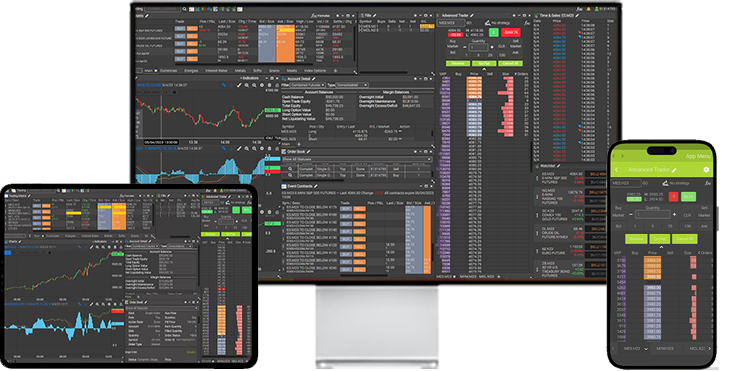
Tour Generic Trader Online, our web platform.
Tour Generic Trader Desktop, our powerful desktop platform.
Tour Generic Trader Generic Trader Mobile, our mobile platform.
Generic Trader Online

Account overview
This is Generic Trader Online’s homepage. At a glance you can see market conditions, your account information, important notifications, scrolling news topics and you can even submit an instant quote

Account detail
The account detail page offers a comprehensive view of your entire account; including cash balances, open trade equity, option values and net liquidating value. Additionally available on this page are your margin balances; including initial and maintenance requirements, total equity and your trading power. Most importantly, all information is instantaneously updated.

Order placement
On this page you may place orders for futures, options, futures spreads, option spreads and even security futures. Additionally there is a preview screen that will allow you to see the market conditions and the details of your order before it is placed.

Offset position
This is a convenient feature that allows you to view existing trades and either offset or add to the positions.

Order status
On this screen you will see the details of all placed orders on one page. You will see the time and date of the original order as well as the resulting fill or working status. For working orders you can cancel or modify directly from this screen.

Quotes
From the quotes page you have several options. You may choose to create a custom list of your favorite markets, view composite quotes of all trading months, detailed quotes of a particular market or even view a page of option chains.

Charts
Generic Trader Online provides real-time charting for all available contracts.


Research
Provided by one of the top industry analysts there are several reports available; including Daily Market Update, Early Morning Report, Top Trading Opportunities and a Bi-Weekly Newsletter.

Market info
This is your market resource center which offers complete contract specifications on of all available markets, daily updated margin requirements and even a margin calculator.

Funds transfer
Finally you can transfer funds in and out of a futures account without having to pick up the phone. Whether you would prefer to wire funds or use the Automated Clearing House (ACH), it can be done directly through this control center on Generic Trader.

Education center
Here is the place to go to brush up on all of your order placing knowledge.

Generic Trader Online Platform
All of these features and more are available with the Generic Trader Online Platform. Get started using either of the links below.
Generic Trader Desktop

Choose Your Experience
As soon as you log into the trading section for the first time, you have the option to choose whether you want a simple streamlined trading environment or you want to customize every detail.

Trading Matrix
This is where you can manage your trading contracts, including futures, options and spreads. You may list as many markets as you wish and choose between dozens of different columns of information from the exchange. From there you may trade directly or from the DoM, view charts, see contract information and other functions as well.

Advanced Trader
With this screen you may see the full market depth from the exchange and completely customize your experience. Create custom strategies or simply use the multitude that are available. You can even plot indicators and custom formulas as their own column within the ladder. Of course trades may be executed in a single click and your position, P/L, and average entry price are displayed.

Charting Engine
Select futures, options or spreads and choose between dozens of indicators and chart types or use your own formulas to create your own. Also, unlike other charting systems, due to our integrated infrastructure and proprietary data aggregation algorithm, you may load an unlimited number of charts without bogging down the system.

Order Book
View details for any order history in your account. Monitor, modify or cancel working and pending orders for continuous management of your futures trading portfolio.

Fill Screens
Keep track of your filled orders, as well as your P/L on the day. View your combined fills, or sort by contract or time. If you are trading multiple accounts you can view fills for each separate account within the same window.

Account Detail
Monitor your live account details. View your margins, positions, and balances in real time. Use the Actions menu to quickly add or offset positions, check individual margin requirements, or open the Advanced Trader (DoM) for any of your open positions.

Time & Sales
View every trade made at the exchange in real-time. Also, since our platform uses completely unfiltered tic data, you can be assured that you see live trades the instant they are filled.

Strategy Screen
Choose between many native strategies, such as Trailing Stops, OCO, Brackets and many more, or create your own with custom formulas. Also, please be advised that all orders are handled at our server levels instead of your computer.

Spread Trader
Generic Trader offers exchange traded spreads or create your own. Also, unlike many systems available, our spread screen allows for unlimited trading legs.

Watchlist
This module was created for those that just want a quick and easy way so see their markets, price info, buy, sell or see a chart. If you just want to open the platform and start trading, this screen was made for you.

Event Contracts
The Generic Trader platform is one of the few available that offers these incredible instruments. Event contracts offer the most intuitive, straightforward way to access over 10 (and soon more) of the world’s most important futures markets. Explore short-term, limited-risk contracts that streamline how you can take part in these benchmark markets.

Formula Editor
Since our platform is completely formula based, clients can use xapiscript directly through this module, instead of complex third party applications. Create custom formulas and apply them as trade signals, custom indicators, order types and order strategies.

Generic Trader Desktop
All of these features and more are available with the Generic Trader Desktop Platform. Get started using either of the links below.
Open an Account
Free Demo
Generic Trader Mobile

Resource Center
The home screen is filled with resources such as news, education, messages and new ones are being added on a regular basis.

Choose Your Experience
As soon as you log into the trading section for the first time, you have the option to choose whether you want a simple streamlined trading environment or you want to customize every detail.

Trading Matrix
The Mobile app’s Trading Matrix is your at-a-glance trading dashboard. Set it to monitor all the contracts and markets you’re interested in watching and not only will you have tick by tick real-time streaming quotes, but you will be able to place orders or navigate directly to the chart or Advanced Trader screens.

Advanced Trader
When it comes to day trading the markets, the Advanced Trader allows the user to trade, view Depth of Market, P&L (profit-loss), as well as many new features that make your trading experience much faster and easier, such as a variety of one-click order placement.

Charting Engine
The Mobile app’s Charts deliver the analytics you need for sophisticated strategies, without needless complexity that just slows you down. Customize them with powerful tools and signals including Bollinger bands, varieties of slow and fast stochastics, MACD, RSI and many more. Customize with a variety of chart types and bar units to support your trading strategy.

Orders Screen
The Mobile app’s Order Book helps you monitor your orders as they are transmitted, working, filled and pending cancellation – for complete, end-to-end visibility of all your trading activity. Keep an eye on the Order Book for no-surprises control – even during volume spikes, and no matter how actively you trade.

Fills Screen
Keep track of your filled orders, as well as your P/L on the day. View your combined fills, or sort by contract or time. If you are trading multiple accounts you can view fills for each separate account within the same window.

Account Detail
The Mobile app’s Account Detail page helps you monitor trading activity with an instant update of your current account balances and positions, in real-time with tick-by-tick updates. Linking all of your trades whether on Mobile, Generic Trader Professional or Generic Trader Online, it keeps you up to date and in control – no matter how or where you placed your trades.

Time & Sales
Generic Trader’s Time & Sales screen shows the actual unfiltered time and price of every transaction, the instant they occur. Now you can see your filled order along with every order filled at the exchange

Strategy Screen
Choose between many native strategies, such as Trailing Stops, OCO, Brackets and many more, or create your own with custom formulas. Also, please be advised that all orders are handled at our server levels instead of your computer. One of the most significant benefits of that is the incredible difference in speed and reliability of ALL orders being held at either the exchange or at co-located servers. Having strategies run from a user’s computer is usually not an option for experienced traders.

Spread Trader
Generic Trader offers exchange traded spreads or create your own. Also, unlike many systems available, our spread screen allows for unlimited trading legs.

Watchlist
This module was created for those that just want a quick and easy way so see their markets, price info, buy, sell or see a chart. If you just want to open the platform and start trading, this screen was made for you.

Event Contracts
The Generic Trader platform is one of the few available that offers these incredible instruments. Event contracts offer the most intuitive, straightforward way to access over 10 (and soon more) of the world’s most important futures markets. Explore short-term, limited-risk contracts that streamline how you can take part in these benchmark markets.

Formula Editor
Since our platform is completely formula based, clients can use xapiscript directly through this module, instead of complex third party applications. Create custom formulas and apply them as trade signals, custom indicators, order types and order strategies.
Generic Trader Mobile Platform
All of these features and more are available with the Generic Trader Mobile Platform. Get started using either of the links below.